
 Reeve
Security basics
Supabase PGRST200: "Could not find a relationship between"
Supabase "Could not find a relationship between" means no foreign key links the two tables. Add one, use ! when there are two, and keep views under RLS.
In short
- Supabase "Could not find a relationship between" (PGRST200) means your app asked for two tables in one request and PostgREST found no foreign key linking them. It joins tables along foreign keys and nothing else.
- Add the foreign key, or join the table that really holds the link. For a signed-up user that is your own profiles table, because the auth schema that holds auth.users is not exposed to your app.
- A view that joins the two tables also makes the error go away. On Supabase a view skips your Row Level Security unless it is created with security_invoker = true, so check it before you rely on it.
You asked your builder to show each order with the customer's name beside it. The orders page is empty now, and the browser console has this:
{
  "code": "PGRST200",
  "details": "Searched for a foreign key relationship between 'orders' and 'customers' in the schema 'public', but no matches were found.",
  "hint": null,
  "message": "Could not find a relationship between 'orders' and 'customers' in the schema cache"
}
Supabase "Could not find a relationship between" means your app asked for two
tables in one request and Supabase found nothing linking them. The link it looks
for is a foreign key: a rule on one table saying that a column, such as
customer_id in orders, holds the id of a row in another table. Without one,
Supabase will not join the two, however obvious the connection looks from your
side.
There are two ways to make the error go away, and one of them can change who can read your data. The first is the foreign key. The second is a view that joins the two tables, and on Supabase a view skips your Row Level Security unless it is created with one extra setting. Ask Lovable, Bolt, v0, Cursor, Claude Code or Replit to make the join work and a view is one of the things it can write. The page fills up again, and nothing on it says who else can read it.
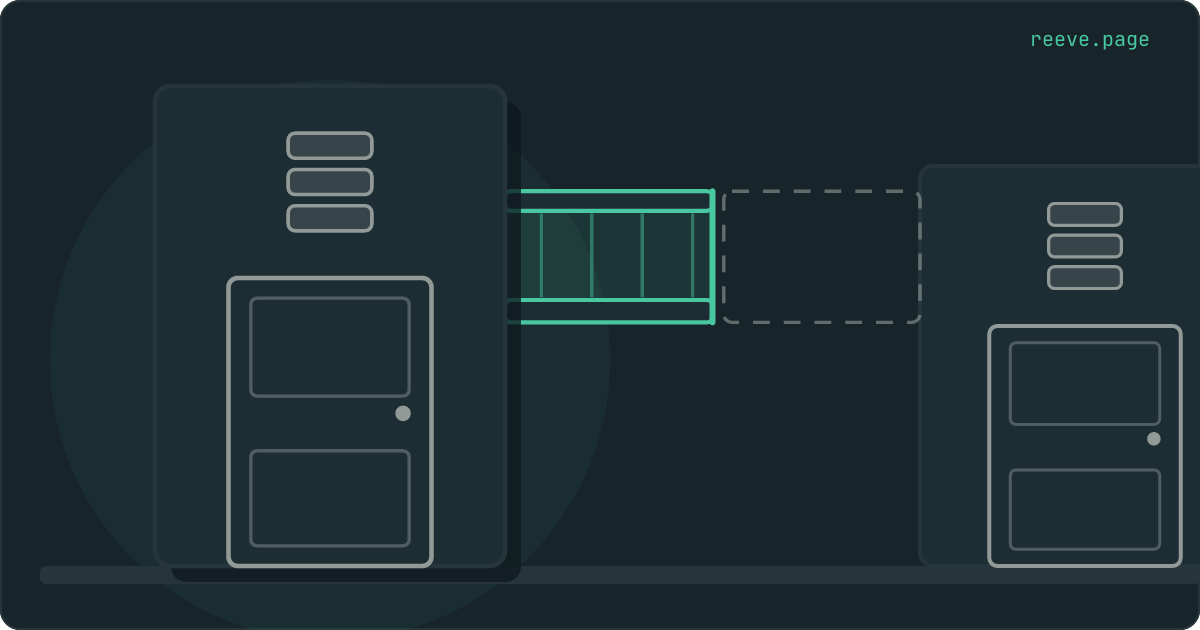
Picture your database as a building. Each table is a room, and Row Level Security is the guard on its door who checks every visitor's pass. A foreign key is a corridor between two rooms. Supabase fetches from two rooms in one trip only by walking a corridor it has on its floor plan.
What does "Could not find a relationship between" mean?
It means Supabase looked for a foreign key between the two tables in the message and did not find one.
The part of Supabase that answers your app's supabase.from(...) calls is
called PostgREST. When you write .select('*, customers(*)') on orders, you
are asking it to fetch each order with its customer attached. Its
documentation
says what it decides that with: "The server uses Foreign Keys to determine which
database objects can be joined together." To avoid asking the database about its
shape on every request, it keeps its own list of tables and foreign keys, called
the schema cache. That list is the floor plan.
The message names both rooms. orders is the table you called .from() on, and
customers is the one you asked to attach. The details line adds the schema
it searched, which is public unless your app was set up to use another. The status
is HTTP 400, which means the request itself was wrong, and PostgREST's
error reference
gives three causes: "stale foreign key relationships, otherwise any of the
embedding resources or the relationship itself may not exist in the database."
So there are three things to check: whether a foreign key exists, whether both names are tables PostgREST can see, and whether its list is out of date.
Cause 1: there is no foreign key
Start here. Your builder made both tables and gave orders a
customer_id column, but never told Postgres, the database Supabase runs on,
what that column points at. To Postgres it is a column of ids like any other.
To check, run this in the SQL Editor. No row back means orders has no foreign
key at all:
select conname, confrelid::regclass as points_at
from pg_constraint
where contype = 'f' and conrelid = 'public.orders'::regclass;
Then add the one that is missing:
alter table public.orders
  add constraint orders_customer_id_fkey
  foreign key (customer_id) references public.customers (id);
Or ask your builder for exactly that: "add a foreign key from orders.customer_id
to customers.id". Either way, Postgres checks every row already in orders
first. Its documentation
says adding a constraint scans the table "to verify that all existing rows in
the table satisfy the new constraint". An order whose customer_id points at a
customer who no longer exists stops it with
the foreign key error, which tells you
which value has no match. Fix or remove those rows, then run it again.
You do not have to tell PostgREST about the new key. Supabase reloads the schema cache by itself after each change to a table, and the post on PGRST204 covers how that works and the one line to run when it does not. Reload the page and the join works.
Two tables linked through a third, such as posts and tags through
post_tags, need one more thing. PostgREST's documentation says that middle
table "must contain foreign keys to other two tables and they must be part of
its composite key", which is the key made of more than one column that tells its
rows apart. primary key (post_id, tag_id) on post_tags is the usual way to
give it one.
Cause 2: the name is not a table PostgREST can see
The second name in the message has to be a table in the schema it searched,
spelled the way the table spells it. When the name is close to a table that
exists, the error says so in its hint:
"hint": "Perhaps you meant 'customers' instead of 'customer'."
On Supabase the name to look at first is users. Supabase keeps signed-up
users in a table called users inside a schema called auth, and its
guide to user data
says plainly: "For security, the Auth schema is not exposed in the
auto-generated API." So .from('posts').select('*, users(email)') looks for a
users table in public, finds none, and returns this error, even when
posts.user_id has a perfectly good foreign key to auth.users. The room is in
a wing that is not on the floor plan.
Supabase's answer is a table of your own. The same guide says "you can create
your own user tables in the public schema" that reference auth.users, and
its example calls that table profiles, with an id that is the user's id. If
your app has one, give posts.user_id a second foreign key, to profiles, and
join that:
alter table public.posts
  add constraint posts_user_id_profiles_fkey
  foreign key (user_id) references public.profiles (id);
const { data } = await supabase.from('posts').select('*, profiles(username)')
This depends on every user having a profiles row, which is what the trigger
that creates one at sign-up is for.
When that trigger fails, sign-ups fail
with it.
What if there are two foreign keys between the tables?
Then the error changes, and the fix is to name the one you mean after a !.
A messages table can point at profiles twice: once for the sender and
once for the receiver. Ask for profiles(*) and PostgREST cannot pick, so it
answers with HTTP 300, the code PGRST201 and the message
Could not embed because more than one relationship was found for 'messages' and 'profiles'.
Its hint lists the choices, each one the table name, a ! and the name of one
foreign key:
Try changing 'profiles' to one of the following: 'profiles!messages_sender_id_fkey', 'profiles!messages_receiver_id_fkey'. Find the desired relationship in the 'details' key.
Copy the names from the hint into your select. The word before each colon is the name the joined row gets in your data, so the two do not overwrite each other:
const { data } = await supabase
  .from('messages')
  .select(
    '*, sender:profiles!messages_sender_id_fkey(username), receiver:profiles!messages_receiver_id_fkey(username)',
  )
Supabase's guide to joins
puts a column name after the ! in its own example (scans!scan_id_start). A
name after the ! that matches no foreign key brings back PGRST200, with
using the hint added to its details.
Can I use a view instead of a foreign key?
You can, and on Supabase it is the version of the fix to be careful with,
because a view skips your Row Level Security unless it is created with
security_invoker = true.
A view is a saved query that your app reads like a table. One that joins
orders to customers looks like the shortest way round this error, since
there is nothing left to join: each row already carries both tables' columns.
Supabase's
Row Level Security guide
says what happens next: "Views bypass RLS by default because they are usually
created with the postgres user." Postgres's own
page on CREATE VIEW
gives the reason. By default, access to the tables behind a view "is determined
by the permissions of the view owner", and the Row Level Security rules applied
are the owner's as well. Supabase's
Security Advisor documentation
calls that "an unintuitive default, chosen for backwards compatibility with older
Postgres versions".
In the building, a view is a counter in the lobby. You ask at the counter, and a clerk fetches from the rooms using the owner's pass. The guards let the owner in, so whoever is at the counter gets what the owner could see.
Who may walk up to that counter is decided by a grant, the Postgres
permission that lets a role such as anon, a visitor who is not signed in, read
a table or a view at all. Supabase used to grant every new table in public to
anon automatically, and
stopped for every project on 30 October 2026.
Postgres counts views as tables when it hands out those default grants, so a view
made while they were on can be read with your app's public key, and
that key ships in your page.
A view made since then is open as soon as somebody grants anon access to it,
which is the grant a permission denied error suggests.
The worst version is a view over auth.users, built to get round Cause 2.
Supabase's Security Advisor has a rule for that alone, "User data exposed
through a view", and says such a view "exposes all user records to all API
users".
The safe version is one line longer. Supabase's guide says that on Postgres 15
and above, setting security_invoker = true makes a view obey the Row Level
Security of its tables when anon and authenticated ask:
create view public.orders_with_customers
with (security_invoker = true)
as
select o.id, o.total, o.created_at, c.name as customer_name
from public.orders o
join public.customers c on c.id = o.customer_id;
Now the clerk carries your pass. Postgres applies "the policies and permissions of the invoking user", so a visitor sees through the view only the rows the rules on both tables allow them. They also need a grant on both tables as well as on the view.
How do I check whether a view ignores my rules?
Open the Security Advisor in your Supabase dashboard. A view that runs with its owner's rights is listed there as Security Definer View.
That is rule 0010. Supabase rates it ERROR, sums it up as "View bypasses
row-level security", and names the view in its detail:
View `public.orders_with_customers` is defined with the SECURITY DEFINER property.
It lists views that anon or authenticated can read, in a schema your app
can reach, on Postgres 15 or later.
To check by hand, run this in the SQL Editor:
select relname as view_name, reloptions
from pg_class
where relkind = 'v' and relnamespace = 'public'::regnamespace;
A view with security_invoker=true or security_invoker=on in the second
column follows your rules. A view with nothing there runs as its owner. Switch
one without rebuilding it:
alter view public.orders_with_customers set (security_invoker = true);
Then open the page as a visitor who is not signed in. Rows that disappear are rows the view was handing out and your rules never allowed. If some of them are meant to be public, write a policy on the table they come from that says so.
security_invoker needs Postgres 15 or later, and select version(); shows
yours. On an older one, Supabase's advice is to protect views by revoking access
from the anon and authenticated roles, or by moving them to a schema your
app cannot reach.
Whether a table or a view hands its rows to a stranger can be seen from outside. Our free scan asks each table and view your app's code names how many rows a visitor with no login can count, reads only the number, and takes about 20 seconds with no account. Scan your app. If a table answers that visitor on its own, switch Row Level Security on and prove it, and check what anyone can already read.
Keeping your data private after the next change
A foreign key stays where you put it. A view, a policy and a grant can all change whenever you or your builder edit the project, and the next view anyone creates runs as its owner unless whoever writes it says otherwise. A view that reads from one table can also take changes when the visitor has a grant to write to it: Postgres's documentation says simple views are "automatically updatable", and by default the write goes through with the owner's rights.
Reeve Monitor keeps checking from outside:
- the full security check every hour, including how many rows a visitor with no login can count in the tables and views your app reads
- whether your app answers, every 60 seconds, and up to 10 more pages you choose
- an alert by email, Telegram, Slack or webhook when the app goes down or a page breaks
- a monthly report on your app, written for you
Reeve Care keeps a copy of your Supabase database:
- an encrypted copy on a schedule, on Reeve's own storage in the EU, outside your Supabase account
- the last copy before a change holds your tables as they were, rows included
- each copy verified before it counts, by counting the rows in every table
- your uploaded files as well, once you connect a Storage credential
- a one-click restore, with a safety copy of the current state taken first
- everything Monitor does
The free scan shows what a visitor with no login can count in your tables and views today. About 20 seconds, and no account.
Scan your app free in 20 seconds
What to do now
What to do
- Read the two table names in the message, and the schema in
details. - Look for a foreign key between the two tables, and add it if it is missing.
- Join your
profilestable for user details, neverauth.users. - When two foreign keys point at the same table, put the one you mean after a
!. - Create any view
with (security_invoker = true), and switch existing ones withalter view. - Check the Security Advisor for views listed as Security Definer View, then open the page signed out.
Start with the foreign key, because it fixes the error without changing who can read what. If your project already has a view, scan your app to see what a visitor with no login can count through it.
FAQ
What does PGRST200 mean in Supabase?
PGRST200 is the code PostgREST, the part of Supabase that answers your app's database calls, gives a request that asks for one table inside another when it finds no foreign key between them. It comes back with HTTP 400 and the message "Could not find a relationship between 'x' and 'y' in the schema cache". The details field names the schema it searched.
How do I join two tables in Supabase?
Give one table a foreign key to the other, then name the second table inside select, as in .select('*, customers(name)'). Supabase works out the join from the foreign key, so nothing else is needed. When two foreign keys point at the same table, add the one you mean after a !.
Why can't I join auth.users in Supabase?
Because the auth schema, where Supabase keeps auth.users, is not exposed to the API your app talks to. Supabase's answer is a table of your own in public that references auth.users, which its example calls profiles. Join that one. Do not put a view over auth.users in public: Supabase's Security Advisor lists that as user data exposed through a view.
Do Supabase views respect Row Level Security?
Not by default. Supabase's documentation says views bypass RLS by default because they are usually created by the postgres user. On Postgres 15 or later, create the view with (security_invoker = true), or switch an existing one with alter view … set (security_invoker = true), and it uses the rules of whoever is asking.
I added the foreign key and still get the error. What now?
Check that the key went into the project your app calls, and that the table names in your select match the real ones letter for letter. Supabase reloads its schema cache by itself after a change to a table. If it is out of date anyway, run NOTIFY pgrst, 'reload schema'; in the SQL Editor.