
 Reeve
Security basics
"new row for relation violates check constraint" in Supabase
Supabase "violates check constraint": a value in the row broke a rule on the table. How to read the rule, and why you should keep it.
In short
- Supabase "new row for relation violates check constraint" (Postgres code 23514, HTTP 400 in your app) means one value in the row broke a rule written on the table. The message names the table and the rule. Nothing was saved.
- Print the rule with pg_get_constraintdef and change the value your app sends. If your app has outgrown the rule, replace it in one transaction. Adding a rule that rows already break fails with "is violated by some row".
- Keep the rule. Your publishable key is meant to be public, so rows can reach the table without your form, and the secret key skips your policies but still meets this check.
You asked your builder for a Cancel button on each order. It added one, you press it, and the order stays exactly as it was. The browser console has the reason:
{
  "code": "23514",
  "details": null,
  "hint": null,
  "message": "new row for relation \"orders\" violates check constraint \"orders_status_check\""
}
Supabase "new row for relation violates check constraint" means one value in the
row your app tried to save broke a rule written on the table, and Postgres
refused to save any of the row. Here the rule is orders_status_check on your
orders table. When the table was made, status was allowed to hold a short
list of words, and cancelled was left off the list.
The quickest way out is one line of SQL that drops the rule, and then the button works. It also removes the one check on that column that applies to every request, including the ones that never go through your app. Read the rule first. The fix is nearly always a word in your code or a word added to the rule.
What does "violates check constraint" mean?
It means the row carried a value the table's own rule refuses, so Postgres
turned down the whole row and wrote nothing. A check constraint is a rule such
as status in ('pending', 'paid', 'shipped') or quantity > 0, stored with the
table and tested on every row that is added or changed.
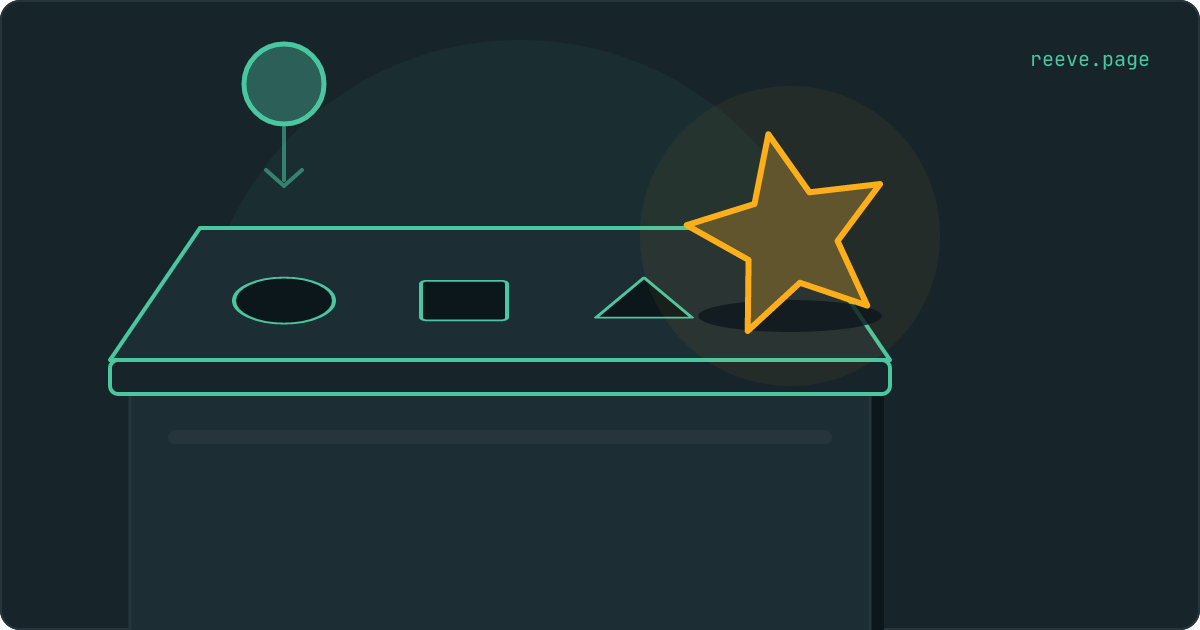
Think of the table as a box, and the check constraint as shapes cut into its lid. A row drops in only through a shape it fits. Your app's form hands people shapes that fit. When a row matches none of the holes it stays on the lid, and the message says which box and which lid.
| Field | Example | What it tells you |
|---|---|---|
code | 23514 | Postgres's code for this error, named check_violation in its list of codes |
message | new row for relation "orders" violates check constraint "orders_status_check" | The table, then the rule. "Relation" is Postgres's word for a table |
details | Failing row contains (…), or null | A copy of the refused row, when Postgres decides the caller may see it. A section further down covers when that is |
hint | null | Nothing to add for this error |
| HTTP status | 400 Bad Request | PostgREST, the part of Supabase that turns supabase.from(...) calls into SQL, sends two constraint codes as 409 in its code, and every other one, this included, as 400 |
The wording comes from the function that tests a row before it is saved, and it reads the same whether the row came from your app, a trigger or the SQL Editor. An update counts as a new row too, so changing an existing order gets the same message.
The rule's name usually tells you the column. When a rule is created without a
name, Postgres makes one up, and
the code that does it
describes the result as "tab_col_check" for a rule about one column and
"tab_check" for one that reads several. So orders_status_check is about
status.
Two neighbours of this error have posts of their own: a value that already exists (23505) and a row that points at nothing (23503). The third, an empty value in a required column, comes up further down.
How do I see what the rule allows?
Ask Postgres. Open the SQL Editor in your Supabase dashboard and run this, with
your own table's name in place of orders:
select conname, pg_get_constraintdef(oid)
from pg_constraint
where conrelid = 'public.orders'::regclass
  and contype = 'c';
pg_constraint is Postgres's list of every rule it keeps, contype = 'c' picks
out the check constraints, and pg_get_constraintdef prints each one as Postgres
stores it. A list of allowed words comes back rewritten, which is why it can look
unfamiliar:
orders_status_check | CHECK ((status = ANY (ARRAY['pending'::text, 'paid'::text, 'shipped'::text])))
That reads: status must equal one of these three. Put it beside the value your
app sent, letter for letter. The usual mismatches:
- A word the rule never listed.
cancelledhere. The rule was written before the button was. - Another spelling of a listed word. Postgres compares text exactly, so
Paidandpaidwith a trailing space both fail a rule that listspaid. A dropdown that sends the label it shows, rather than the value behind it, is where these usually come from. - A number outside a range.
check (rating between 1 and 5)comes back as((rating >= 1) AND (rating <= 5)), and a star picker that resets to 0 fails it. - An empty piece of text. A rule such as
char_length(name) > 0refuses'', which is what a cleared text box sends.
Fix the value, or change the rule?
Fix the value when the rule is right, and change the rule when your app has
outgrown it. A dropdown sending Paid is the first case: send paid, and the
rule stays as it was. A new button for a state the rule has never heard of is the
second.
To change a rule, replace it inside one transaction, so the table is never left without one:
begin;
alter table public.orders drop constraint orders_status_check;
alter table public.orders add constraint orders_status_check
  check (status in ('pending', 'paid', 'shipped', 'cancelled'));
commit;
Adding a rule makes Postgres test every row already in the table against it, and its documentation warns that "other updates to the table are locked out" until the change is committed. A list that only grew passes every old row. If the add fails anyway, nothing in the transaction is kept, and the old rule is still in place.
If your builder writes the migration for you, read it before it runs. A
drop constraint with no add constraint after it is the version that removes
the rule.
A check constraint can only look at the row being saved. The same documentation
says Postgres "does not support CHECK constraints that reference table data
other than the new or updated row being checked", in
its chapter on constraints.
A rule that depends on another table, such as how much stock is left or who owns
the order, belongs in a policy or a trigger.
Why not drop the check constraint?
Because it is the one rule about values that holds for every request, including the ones that never touch your form.
Your form hands out shapes that fit the lid. Anyone can reach the box without
it. Your app talks to Supabase with its publishable key (the anon key in
older projects), and that key sits in the code every visitor downloads, on
purpose. Supabase's own
guide to API keys
calls it "Safe to expose online: web page, mobile or desktop app, GitHub
actions, CLIs, source code", because "Anyone can read it, so it only reaches
what Row Level Security allows".
Why that key is meant to be there,
if it sounds wrong.
So anyone who copies the key out of your app can send a row straight to your table, with any value your policies let through. Row Level Security, Supabase's rules about who may touch which rows, decides whose rows a request may write. The check constraint decides what may be in them. A signed-in customer calling the API with their own login is writing their own rows, and your insert policy is right to let them. With no rule on the columns, they can save an order line for minus three items, a review with 500 stars, or an order whose status no screen in your app knows, which then drops out of every list your app shows.
The secret key is held to it as well. The same guide says the secret key
(service_role in older projects) "has the BYPASSRLS attribute, so it skips
every Row Level Security policy you attach", and a check constraint sits outside
the policies. Postgres tests it on every row written, whoever writes it, so a
bug in an Edge Function that holds the secret key meets the same lid as a
stranger.
Whether a stranger can write to your tables comes down to your policies. What they can read is something you can see from outside: our free scan asks each table your app's code names how many rows a visitor with no login can count, reads only the number, and takes about 20 seconds with no account. Scan your app.
Is this my policy's WITH CHECK?
No. A policy's with check clause fails with a different message and a
different code:
new row violates row-level security policy for table "orders"
That one is code 42501, and it has its own post. The two are easy to mix up, because both start with "new row" and both involve something called a check. "violates check constraint" always names a rule on the table, and the fix for it is never in your policies.
Postgres also tests them in a fixed order. In the code that saves a row, "Check any RLS WITH CHECK policies." comes before "Check the constraints of the tuple." on an insert, and an update runs the two in the same order. Tuple is Postgres's word for a row. So a 23514 means the row had already passed your policies: the person saving it was allowed to save that row, and only the value was wrong.
"check constraint … is violated by some row"
That message comes from adding a rule to a table. At least one row already in the table breaks the new rule, so Postgres refused to add it, and nothing changed. It carries the same code, 23514.
You usually meet it in a migration your builder wrote: a rule such as
check (quantity > 0) added to a table that already holds an old order line
with a 0 in it. It is a new lid on a box that already has things inside, and
Postgres tries everything inside against the new holes first. One that does not
fit is enough to refuse the lid.
The code that adds a rule
words it like this:
ERROR: check constraint "order_items_quantity_check" of relation "order_items" is violated by some row
Find the rows by asking for the opposite of the rule:
select id, quantity
from public.order_items
where not (quantity > 0);
Then fix each one, or delete it if it should never have existed, and add the rule again. Both change data you cannot get back by undoing the migration, so make a copy of the database first.
If the old rows need somebody to look at them before they change, add the rule
now with not valid:
alter table public.order_items
  add constraint order_items_quantity_check check (quantity > 0) not valid;
Postgres's documentation says the rule "will still be enforced against subsequent inserts or updates", while "the database will not assume that the constraint holds for all rows in the table" until you validate it. So an update to an old row that breaks the rule fails, even when the update changes some other column, because the updated row is a new row and gets tested. Once the old rows are fixed:
alter table public.order_items validate constraint order_items_quantity_check;
That reads the whole table again, and the documentation says this step "does not need to lock out concurrent updates", so your app keeps saving while it runs.
Why did an empty value get through?
Because a check constraint lets a row in when its rule comes out true or unknown, and a comparison with an empty value comes out unknown. Postgres's chapter on constraints says: "a check constraint is satisfied if the check expression evaluates to true or the null value." Null is Postgres's word for no value at all.
So check (quantity > 0) stops a minus three and lets a missing quantity
straight through. The where not (quantity > 0) search above skips empty values
for the same reason, which matches the rule. If the column must always hold a
value, give it the not-null rule as well:
alter table public.order_items alter column quantity set not null;
That rule has an error of its own, and the post on "null value in column violates not-null constraint" covers where an empty value usually comes from.
Is it safe to show this error to your users?
No. Show a sentence of your own and keep the raw error in your logs. The detail
line, Failing row contains (…), is a copy of the row as it would have been
saved, and the same Postgres function writes it for this error as for the
not-null one. A request with your publishable key to a table with Row Level
Security on gets "details": null, which is what the console at the top of this
page showed. Server code holding the secret key gets the whole row, and passes it
to the browser if it returns the error as it came. The not-null post linked above
goes through both cases.
In the app, catch the code and say what the person can do about it:
const { error } = await supabase.from('order_items').insert(item)

if (error?.code === '23514') {
  setMessage('Choose a quantity of 1 or more.')
} else if (error) {
  setMessage('Something went wrong. Please try again.')
}
Before you change a table's rules
Keep a copy of the database from before you rewrite rows or replace a rule, and hear about it when a table starts answering strangers.
Reeve Care keeps a copy of your Supabase database:
- an encrypted copy on a schedule, on Reeve's own storage in the EU, outside your Supabase account
- the last copy before you fix the rows a new rule refuses holds them as they were
- each copy verified before it counts, by counting the rows in every table
- your uploaded files as well, once you connect a Storage credential
- a one-click restore, with a safety copy of the current state taken first
- everything Monitor does
Reeve Monitor keeps checking from outside:
- the full security check every hour, including how many rows a visitor with no login can count in the tables your app reads
- whether your app answers, every 60 seconds, and up to 10 more pages you choose
- an alert by email, Telegram, Slack or webhook when the app goes down or a page breaks
- a monthly report on your app, written for you
The free scan shows what a visitor with no login can count in your tables today. About 20 seconds, and no account.
Scan your app free in 20 seconds
What to do now
What to do
- Read the table and the rule in the message. A rule created without a name is called after its table and column.
- Print the rule with
pg_get_constraintdefand compare it with the value your app sent, capitals and spaces included. - Fix the value when the rule is right. When your app has outgrown the rule, drop it and add the new one in a single transaction.
- Keep the rule. Your publishable key is public, and the rule on the table holds for every request, the secret key's included.
- For "is violated by some row", find the old rows with
where not (…), copy the database, then fix them, or add the rulenot validand validate it later. - Add
not nullas well when the column must always hold a value.
Start with the rule's definition, because it decides which of the two fixes is right. If the fix changes rows already in the table, keep a copy of the database from before you run it.
FAQ
What does new row for relation violates check constraint mean?
It means a row your app tried to save had a value that broke a rule written on the table, so Postgres refused the whole row and saved nothing. The message names the table and the rule. A rule created without a name is called after its table and column, such as orders_status_check. The code is 23514, and from a Supabase app it arrives as HTTP 400.
How do I see what a check constraint allows?
In the SQL Editor, run select conname, pg_get_constraintdef(oid) from pg_constraint where conrelid = 'public.orders'::regclass and contype = 'c'; with your own table name in place of orders. Postgres prints each rule as it stores it, so a list of allowed words comes back as = ANY (ARRAY[...]). Compare it with the exact value your app sent, capitals included.
Should I drop the check constraint to make the error go away?
Change the value your app sends, or replace the rule with one that fits what your app does now. The publishable key in your app is meant to be public, so rows can reach the table without your form, and the rule on the table is what still holds for them. The secret key skips your Row Level Security policies and is still held to a check constraint.
Why does adding a check constraint fail with is violated by some row?
Because Postgres tests every row already in the table before it adds the rule, and at least one of them breaks it. Nothing was changed. Find those rows by selecting where not (your rule), fix or remove them, and add the rule again. Or add it with not valid, which holds new and changed rows to it at once, and validate it when the old rows are fixed.
Is violates check constraint a row-level security error?
No. A policy's with check clause fails with new row violates row-level security policy and code 42501. Violates check constraint names a rule on the table itself, with code 23514. Postgres tests the policies first, so a 23514 means the row had already passed them.